
How Teachers Can Turn Excel Question Sheets into Live Smartboard Math Battles (No Login Required)
Say goodbye to paper tests and student login friction! Learn how teachers can upload any Excel or CSV question list (up to 100 questions) to launch an instant, split-screen Smartboard Tug of War math competition.
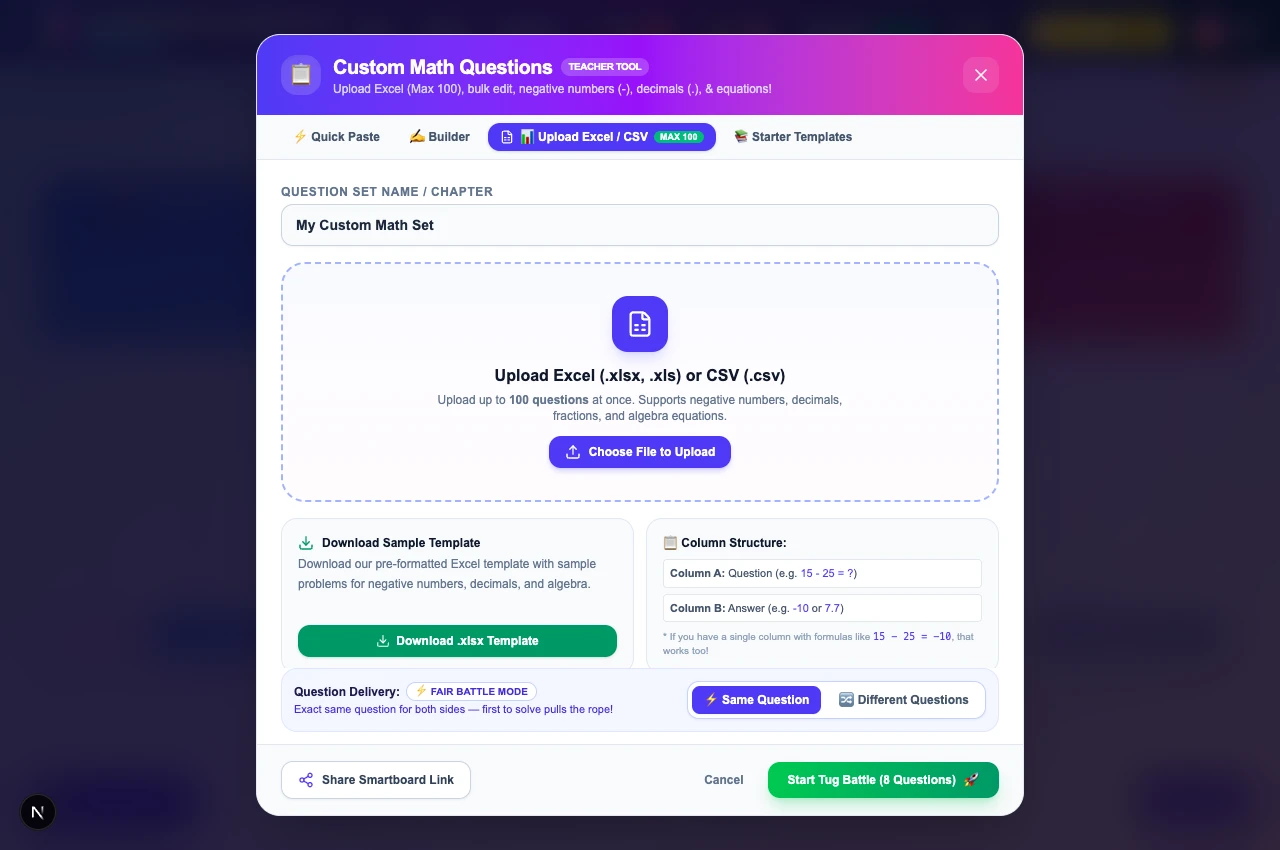
Every educator knows that standard Friday review worksheets often lead to disengaged groans and distracted students. While digital quiz platforms like Kahoot or Blooket can add excitement, they come with significant friction: requiring every child to have an individual 1-to-1 Chromebook, managing forgotten student passwords, or dealing with expensive district software paywalls.
What if you could take a simple spreadsheet of math problems you already wrote and transform it into an interactive 2-player split-screen Tug of War game on your classroom Smartboard or projector in under 10 seconds — with zero logins required?
Thanks to a wonderful feature recommendation from classroom educator Julia Jammoul (@juliajammoul), MathTug has officially launched the Custom Questions Engine with direct Excel (.xlsx) and CSV upload support for up to 100 questions.
Here is your complete teacher's guide to creating custom math competitions for your classroom.
Step 1: Format Your Excel or CSV Question Sheet
You don't need fancy software or complicated formulas. MathTug is designed to read standard, everyday spreadsheets:
- Column A: The math problem (e.g.
15 - 25 = ?or2x + 4 = 10or3.5 * 4 = ?) - Column B: The numerical answer (e.g.
-10,3,14)
Want a ready-made template? You can open the custom question tool and click “Download Sample Template” to get a pre-formatted Excel template with sample problems for negative integers, decimals, and algebra.
Pro Tip: Even if you only have a single column with full equations like 12.5 - 7.5 = 5 or Half of 50 = 25, MathTug's smart parser automatically identifies the question and extracts the correct answer!
Step 2: Upload Your File (Up to 100 Questions)
Once your questions are ready, head over to Math Tug of War Custom Mode:
- Click on the “📊 Upload Excel / CSV” tab at the top of the modal.
- Drag and drop your
.xlsx,.xls, or.csvfile into the dropzone (or click Choose File to Upload). - MathTug instantly validates and parses up to 100 questions. Any header rows (like "Question" or "Answer") are automatically detected and filtered out.
You will immediately see your complete question set organized in the Step-by-Step Builder.
Step 3: Review, Bulk Edit & Bulk Delete
Classrooms are dynamic, and teachers need total control over what appears on screen. The new Builder provides powerful batch management tools:
- Multi-Select Checkboxes: Check individual questions or click “Select All” to manage questions in bulk.
- 🗑️ Delete Selected: Remove unwanted or duplicate problems with one click.
- ✏️ Inline Row Editing: Spot a typo? Click the pencil icon on any question to modify the problem text or adjust the answer without having to delete and re-enter it.
- 📝 Bulk Edit (Text Mode): Click “Bulk Edit (Text)” to open all questions in a freeform text editor where you can copy, paste, or rearrange lines freely.
Step 4: Choose Your Question Delivery Mode
Every classroom dynamic is different. MathTug lets teachers toggle between two specialized game modes:
⚡ Mode A: Fair Battle (Same Question Race)
Both Red and Blue contestants see the exact same question simultaneously on the Smartboard. The first student to calculate and punch in the answer pulls the rope towards their side. This mode is ideal for high-energy classroom spectator tournaments where the entire audience is cheering and calculating along in their heads!
🔀 Mode B: Independent Pace (Different Questions)
Each player receives separate questions from your uploaded set. Students solve problems at their own natural speed without waiting on their opponent. This mode is perfect for mixed-ability pairings, differentiated instruction, or calm practice stations.
Step 5: Share with One Click (No Logins Required!)
Planning for a substitute teacher, grade-level team partner, or computer lab session? Click the “Share Smartboard Link” button in the bottom left corner.
MathTug compresses your entire 100-question set directly into the link URL. When you paste this link onto another smartboard or share it via Google Classroom, the game opens immediately with your exact questions, title, and settings pre-loaded. No accounts to create, no passwords to remember, and 100% compliant with student privacy laws.
Ready to Try It in Your Classroom?
Transform your next math review from passive seatwork into an active, collaborative Smartboard competition your students will ask to play every day!
Create Your Custom Math Battle
Upload your Excel sheet or paste custom math problems with negative numbers, decimals, and algebra equations.
🚀 Open Custom Math Tug of War (100% Free) →Recommended Hands-on Math & Focus Tools
Top-rated learning tools on Amazon that support the strategies in this article:



📥 Get Our Free Classroom Math Puzzles & Worksheets
Enjoyed this guide? Join our educator community and receive weekly printable activities and mental math worksheets.
About the Author: Shubham
Math Educator & Developer
Shubham is a dedicated math educator and software engineer with a passion for gamifying education. He created MathTug to help teachers and parents utilize interactive digital games on smartboards and projectors to make math learning collaborative, active, and stress-free for kids.
Learn more about our educational mission on the About Us page →Enjoyed this post?
Share it with your colleagues or explore more fun ways to teach math on MathTug.
🎮 Play Games